

Dialpad
Udviklet af - Dialpad, Inc.
Installeringer - 5K installationer
Rangering 3,6
(222)

Ledende
Krav
HubSpot-abonnement Tilladelser til HubSpot-konto - Se de nødvendige kontotilladelser
Adgangstype Delt Dialpad abonnement - Fordele eller Virksomhed planer
Oversigt
1/6 - Video, der giver et overblik over Dialpads indbyggede HubSpot CRM-integration, med fokus på AI-baserede opkald og beskeder
Dialpad integrerer avancerede AI- og SMS-funktioner direkte i dine HubSpot-arbejdsgange, hvilket giver dig større rækkevidde i dine HubSpot-interaktioner.
Saml din kommunikation
Overfør al din kommunikation fra Dialpad til HubSpot CRM og tilbage igen for at skabe et samlet og handlingsorienteret overblik over dine kunder.
Automatiser arbejdsgange for større effektivitet
Konfigurer automatisk oprettelse af tickets i HubSpot baseret på aktiviteter, såsom indgående og udgående opkald, SMS og ubesvarede opkald.
Komplet historik over kundeinteraktioner
Opret nye HubSpot-kontakter fra Dialpad, match eksisterende HubSpot-kontakter med Dialpad-kontakter, og vis kontaktprofilen samt tidligere og igangværende aktiviteter.
Funktioner
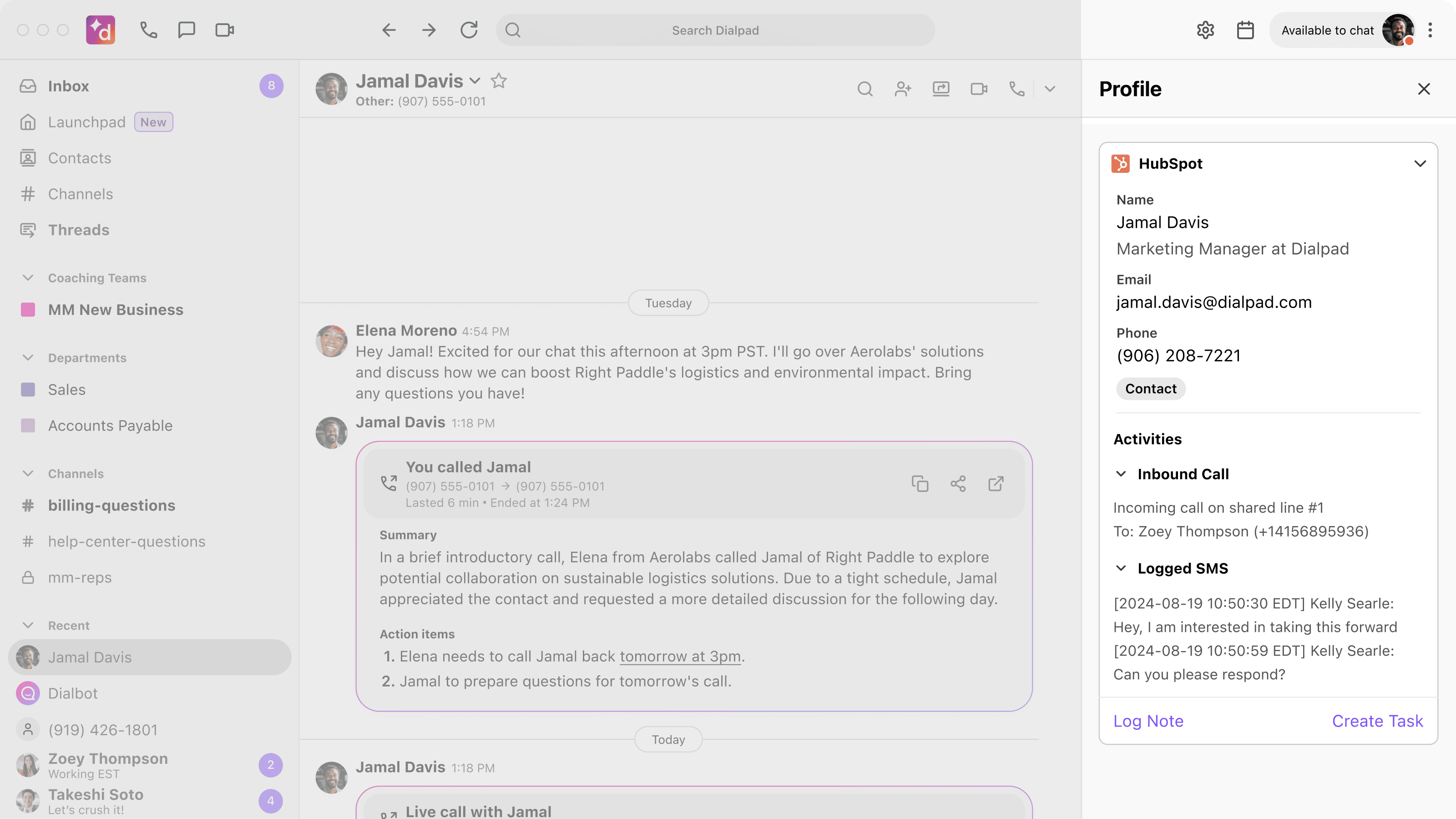
Fuldstændig kontaktoversigt
Få et fuldstændigt og samlet overblik over dine kontakters aktiviteter. De vigtigste kontaktoplysninger fra HubSpot vises i Dialpad, når du foretager eller modtager opkald eller SMS-beskeder, så du kan gøre et godt førstehåndsindtryk. Alle opkald registreres i HubSpot og matches automatisk med eksisterende kontakter, hvilket giver en omfattende og opdateret historik.
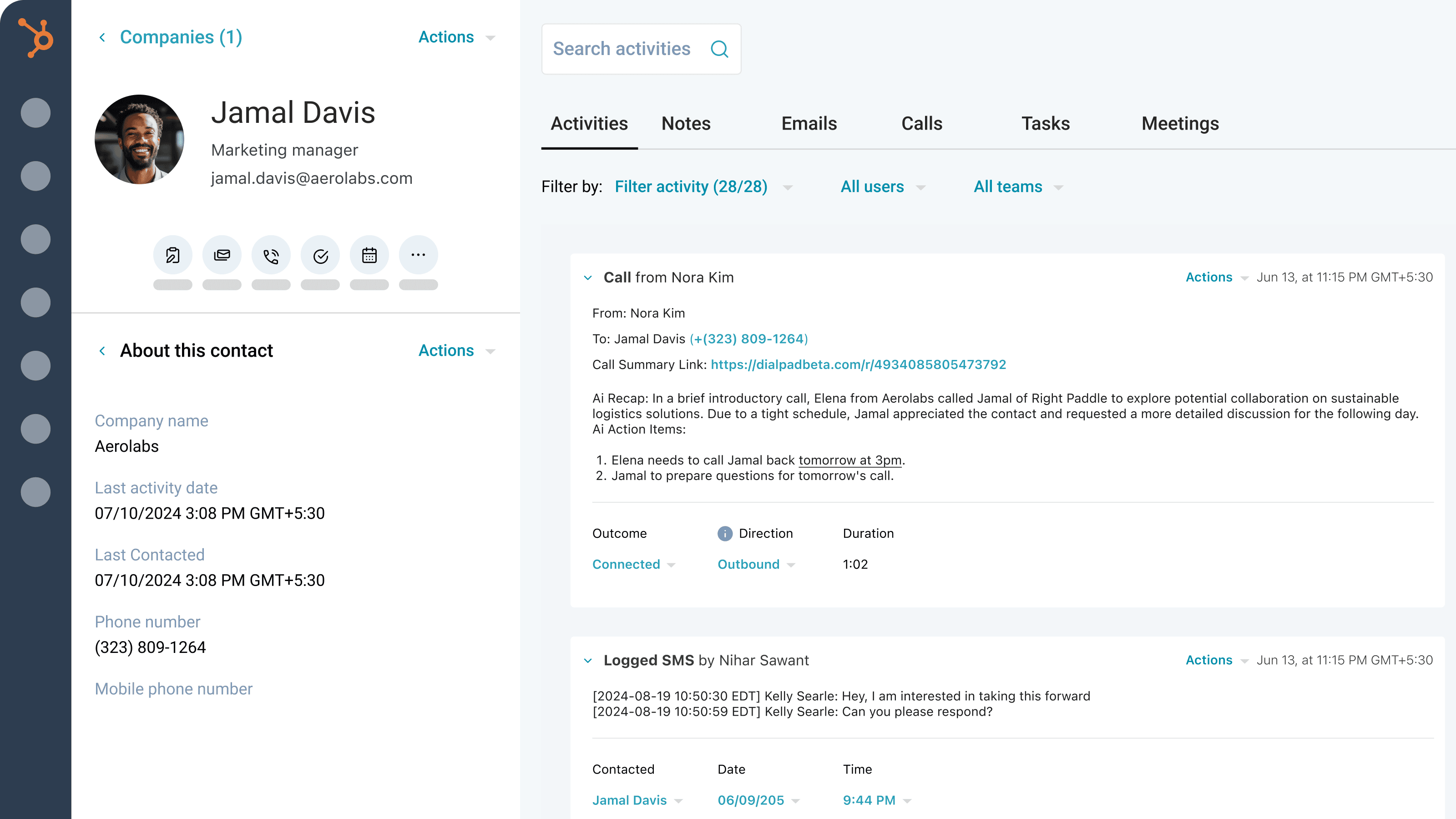
AI-drevet registrering af opkald og SMS’er
Få det fulde overblik over hver eneste interaktion. Dialpad Ai genererer og registrerer automatisk detaljerede oplysninger om opkald, såsom opgaver, resuméer, CSAT-scores, formål og resultat. Vi registrerer også alle dine SMS-beskeder. Du kan udvide disse logfiler med resultater, tilknyttede aftaler og optagelser af opkald direkte i HubSpot.
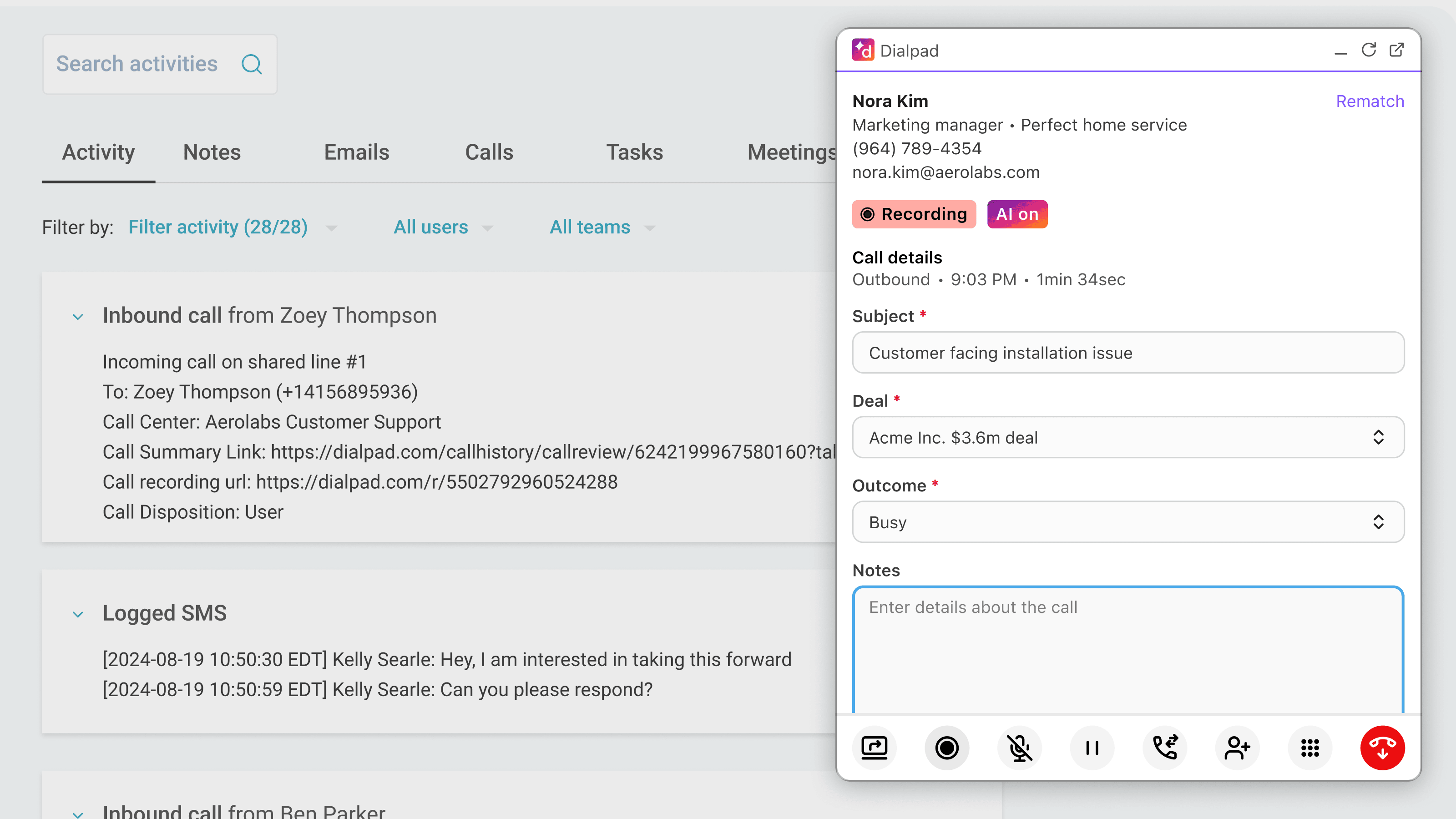
Effektiviseret kommunikation
Administrer al din kommunikation uden at skulle skifte mellem forskellige apps. Foretag og modtag opkald direkte i HubSpot ved hjælp af Dialpad, så du slipper for at skifte mellem skærmbilleder.
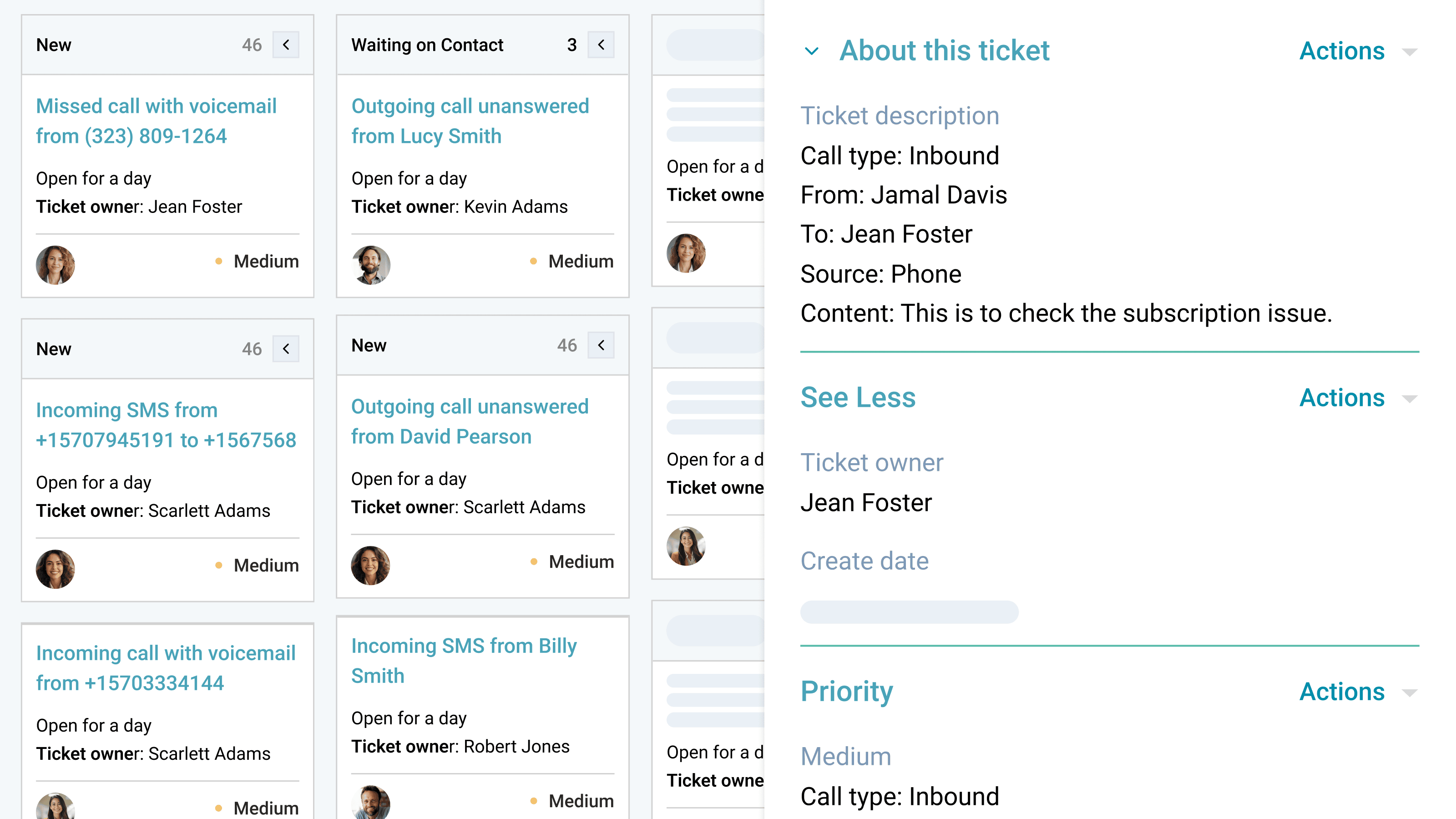
Automatiseret opfølgning og oprettelse af sager
Gå aldrig glip af en henvendelse eller en mulighed for opfølgning. Dialpad-integrationen opretter automatisk sager for ubesvarede opkald eller beskeder på delte linjer eller personlige numre. Det sikrer, at dit team kan følge op med det samme, give hurtige svar og forbedre kundeservicen uden manuel indsats.
Appfunktionalitet
Sidebar and calling widget | ||
Calls | ||
Calls | ||
SMS | ||
Sidebar and calling widget | ||
Sidebar and calling widget | ||
Calls | ||
SMS | ||
SMS | ||
Sidebar and calling widget |
Anmeldelser
3,6
222
3,6
222
- 27. jul 2026
Der er brug for støtte
Salgsrepræsentantens HubSpot-konto er ikke tilknyttet, og derfor kan vedkommende ikke foretage opkald via Dialpad.
Salgsrepræsentantens HubSpot-konto er ikke tilknyttet, og derfor kan vedkommende ikke foretage opkald via Dialpad.
Kuzyshyn, Y.
- 22. jul 2026
Parikh, S.
Priser
Fordele
25 US$
/månedØg produktiviteten med avancerede integrationer, support døgnet rundt og administration af flere kontorer – ideelt til virksomheder i vækst, der har brug for større fleksibilitet.
Ubegrænset HD-telefoni
Telefonnumre til virksomheder
Telefonsvarer
Gratisnumre
25 afdelinger og 10 kontorer
Ventekøer
Brugerdefineret opkaldsdirigering og viderestilling
Nummeroverførsel og viderestilling
Optagelse af opkald
Automatisk spam-detektering
Synkronisering af kontakter
SMS, MMS og gruppebeskeder
Internationale SMS-beskeder
Fildeling
Transskriptioner af opkald og telefonsvarerbeskeder i realtid
Analyser og rapportering i realtid
Fordele
25 US$
/månedØg produktiviteten med avancerede integrationer, support døgnet rundt og administration af flere kontorer – ideelt til virksomheder i vækst, der har brug for større fleksibilitet.
Ubegrænset HD-telefoni
Telefonnumre til virksomheder
Telefonsvarer
Gratisnumre
25 afdelinger og 10 kontorer
Ventekøer
Brugerdefineret opkaldsdirigering og viderestilling
Nummeroverførsel og viderestilling
Optagelse af opkald
Automatisk spam-detektering
Synkronisering af kontakter
SMS, MMS og gruppebeskeder
Internationale SMS-beskeder
Fildeling
Transskriptioner af opkald og telefonsvarerbeskeder i realtid
Analyser og rapportering i realtid
* Priserne her er kun til visningsformål. Alle priser er ekskl. afgifter, incitamenter, rabatter eller andre prisvariabler. Du bør kontakte partneren for at få de mest ajourførte og korrekte prisoplysninger. HubSpot påtager sig intet ansvar for disse prisoplysninger, som leveres af vores partnere. Priser sidst opdateret: 14.08.2026
Flere oplysninger
Udviklet af - Dialpad, Inc.
Installeringer - 5K installationer
Kategorier Sprog som denne app er tilgængelig på Engelsk ogJapansk