

Conversations Export & Analytics
Bulk export full HubSpot conversation text with 26 columns of…
Built by - Conversations Export & Analytics
Installs - 500+ installs
Rating 4
(4)
Requirements
HubSpot Plan HubSpot Account permissions - View the required account permissions
Access Type Shared Conversations Export & Analytics Subscription - Free Trial, Conversation Starter Export Credits, Analytics & Automation Starter, Analytics & Automation Pro, or Analytics & Automation Executive plans
Overview
1/7 - Conversations Export Install and Export Demo
Every conversation your team has had is sitting in HubSpot: Customer Feedback, Buying Signals, Recurring Complaints, Unmet Needs, Response Times, Resolution Rates and Agent Performance. Conversations Export & Analytics is the only integration that unlocks all this data for you. No custom development, no formulas, no manual work.
Analyze what your customers are actually saying, understand how your team responds, and report on support operations with real numbers. Clean, structured CSV or JSON files that import directly into the tools you already use.
Trusted by 400+ HubSpot teams for conversation data export and analytics.
Key Features
16 standard columns capturing every detail of each conversation -- who, when, and what was said
10 analytics columns measuring team performance and response quality across every thread
Supports all Conversation Channels: Email, Live Chat, Facebook Messenger, WhatsApp, and SMS
Scheduled Exports -- automate recurring exports on your chosen cadence and receive data automatically by email
First response time, resolution time, and agent handoff tracking built into every row
Bot vs. human detection -- see which conversations were resolved without agent escalation
Inbound and outbound message counts split by direction for volume analysis
CSV and JSON formats with optional anonymization for privacy or AI training use cases
Filter exports by date range across any inbox or channel
Built for Teams That Run on Data
Support managers: Review agent and bot performance with first response time, resolution time, and unique agent counts per conversation.
Operations teams: Track inbound vs. outbound volume by channel and workspace to plan staffing.
Agencies and analysts: Download clean, consistent files ready to import into any spreadsheet, BI tool, or database.
Compliance teams: Use the anonymization option to strip emails and mask names before sharing externally.
Why Choose Conversations Export & Analytics?
Your data stays yours, export on demand with no lock-in and no waiting on HubSpot's native reporting
Works with every HubSpot plan with no upgrades or API access required
Large conversations paginate automatically so nothing gets truncated
Email notifications when your export is ready to download
What Users Are Saying
"This thing saved my life. I was going to have to pull 3 years of conversations manually." -- Leo, Lloyd Michaels Digital Marketing
"I found the tool really useful as it saved me a bunch of manual work." -- Ben, EchoAgent
"Exported the conversations just as needed! Thank you so much for the fast update!" -- Sofiya, Sandora
"This is one of the features we were really missing on HubSpot and this is great!" -- Emily, Compass Group
Frequently Asked Questions
Is my data secure? Yes. All exports are encrypted in transit and stored securely for 7 days, then automatically deleted by the storage platform's data retention policy.
How do I get my CSV or JSON file? After export, your file is available for download directly in the app and via an email download link.
What columns are included? Each export includes up to 26 columns: Format Version, Conversation ID, Status, Channel, Workspace, Start Time, End Time, Closed At, Assigned To, Participant Names, Participant Emails, Participant Roles, Subject, Conversation, Conversation Page, and Conversation Total Pages -- plus 10 analytics columns: Duration, Resolution Time, Message Count, Inbound Messages, Outbound Messages, First Response Time, Avg Response Time, First Agent Name, Unique Agent Count, and Bot Handled.
Can I export conversations from multiple accounts? Each HubSpot portal is treated as a separate account with unlimited users. Simply install Conversations Export & Analytics on each portal and subscribe per portal.
Install Conversations Export & Analytics and export your first conversations in minutes.
Features
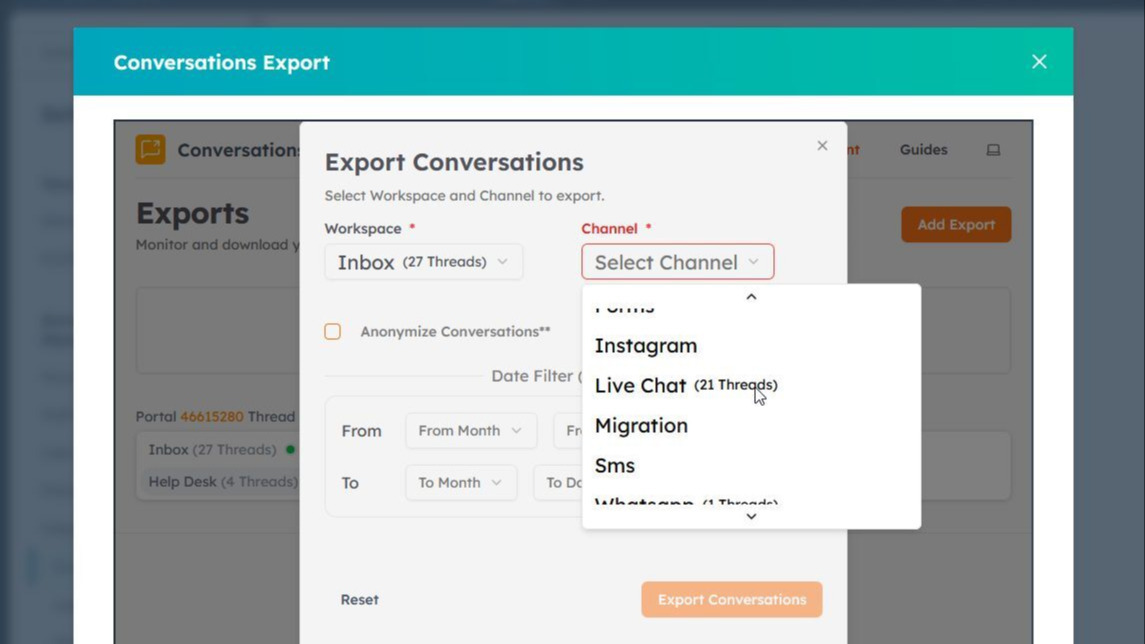
Export By Channel
Use our easy form to export HubSpot Conversations data from multiple channels including Live Chat, Facebook Messenger, Email, Forms, Customer Portal, Whatsapp, Calls and Sms.
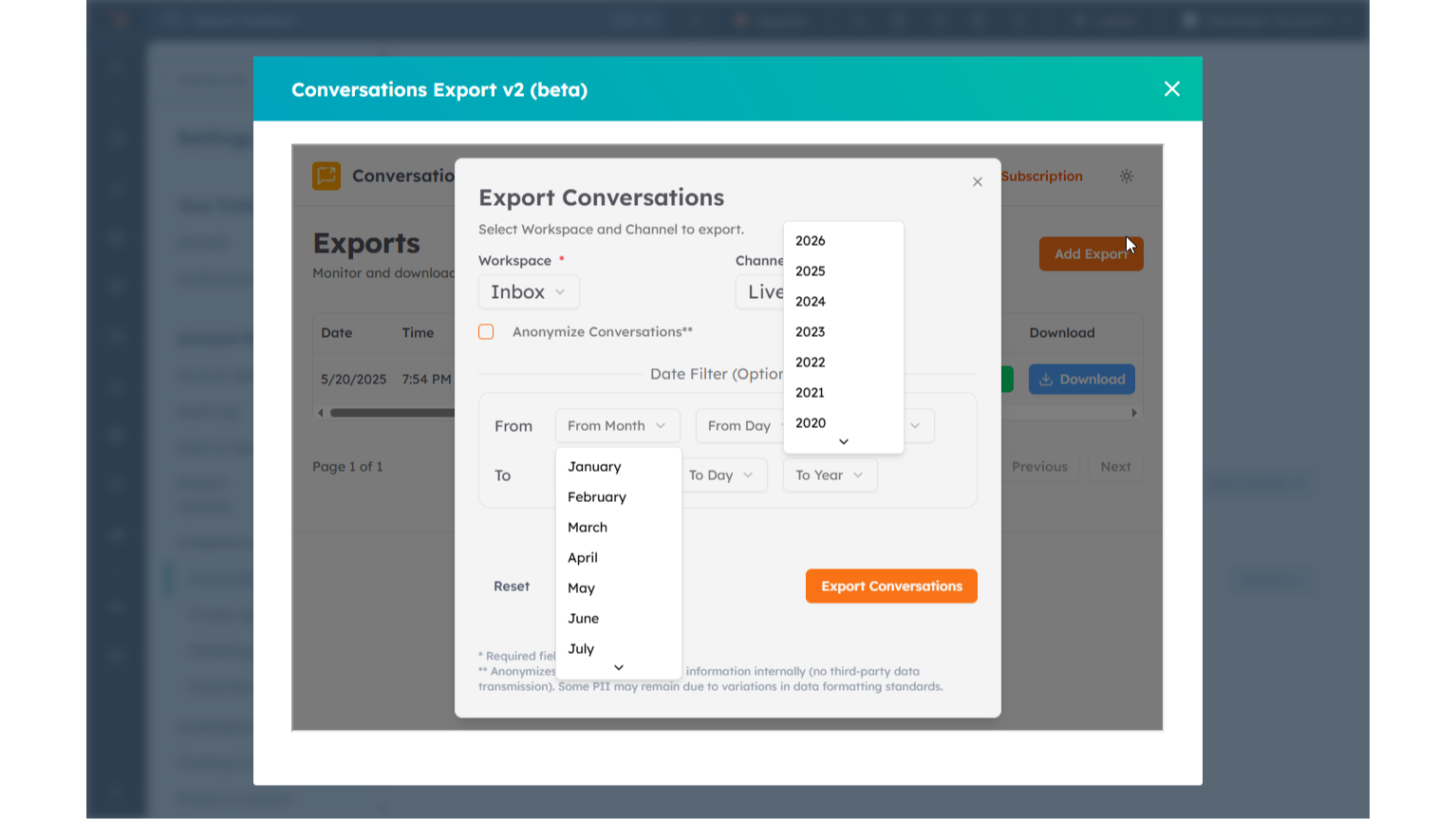
Filter By Dates
Choose dates by month and year to select specific periods of your HubSpot Conversations data.

Export Ready Notifications
Export notifications email users when their export finishes with a download link, or alert them when a scheduled export runs empty, so they never have to check back manually to know if their data is ready.
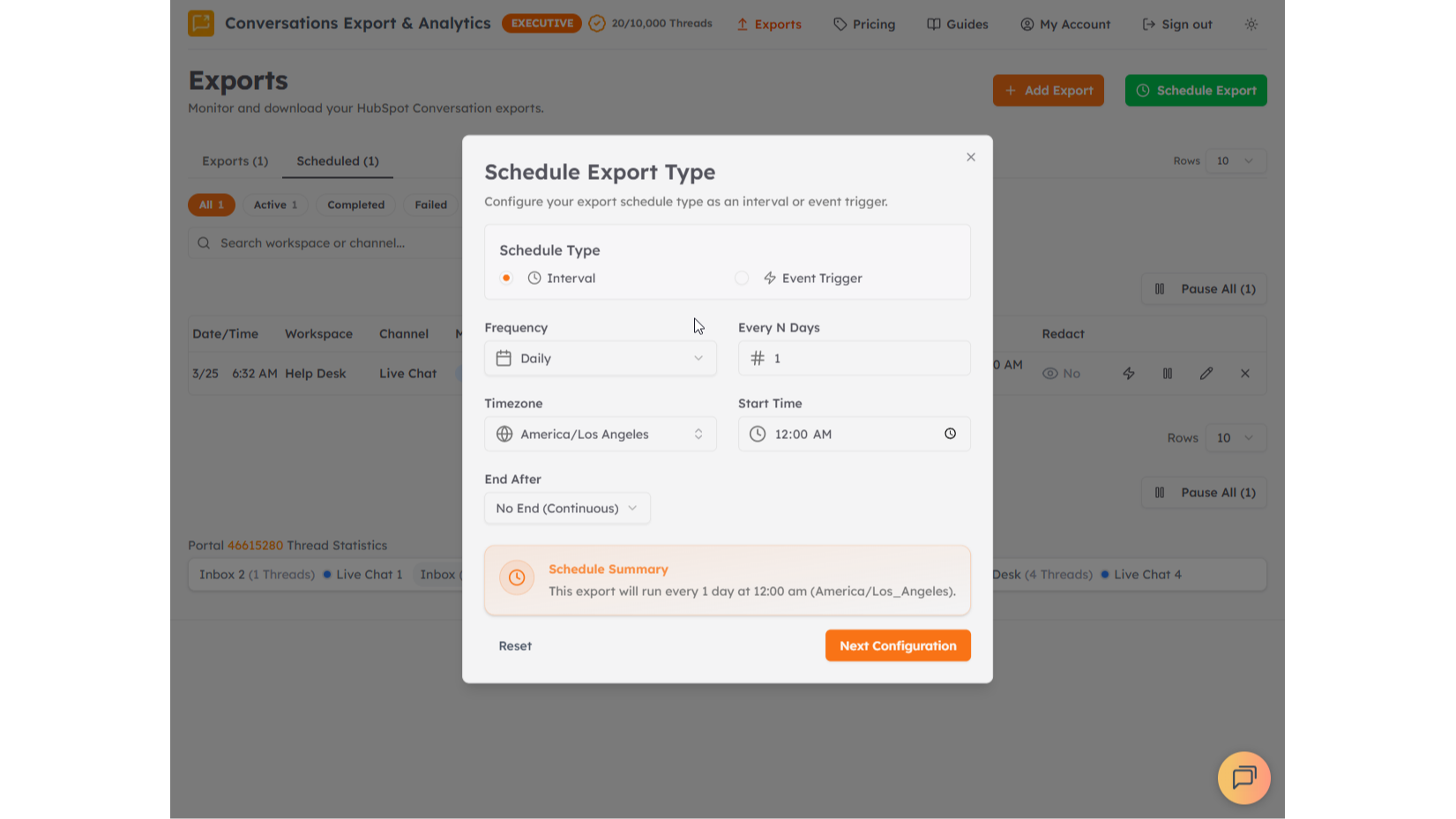
Automate Exports
Scheduled exports automatically deliver HubSpot conversation data on a set cadence or when events like conversation closures happen, eliminating the need to manually run exports for recurring reporting, compliance, or review needs.
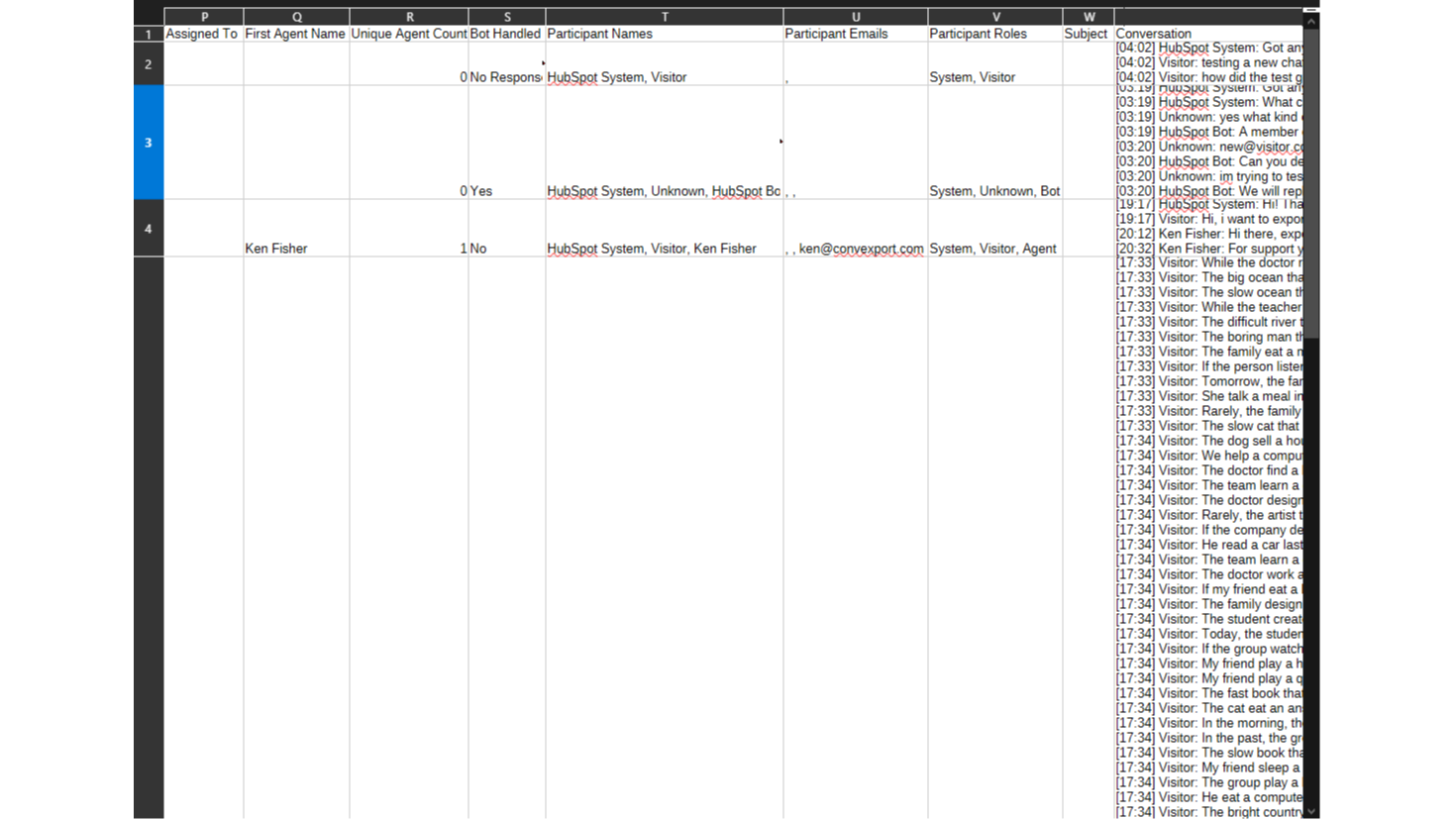
Analytics
Analytics columns add computed metrics like response times, message counts, and resolution data to each exported conversation, giving teams ready-made reporting data without having to calculate it themselves in a spreadsheet.
App Functionality
Shared Data
CSV or JSON File |
Reviews
4.0
4
4.0
4
- Apr 10, 2026
Perfect solution for what HubSpot should already do - exported conversations flawlessly for AI analysis in another system
Great product - amazing that you can't export conversations straight from HubSpot but this solved for me. I was looking to run our conversation history through Claude to find common themes, and get a feeling for what's going on. This worked perfectly
Maclean, S.
- Aug 8, 2025
Kasavin, B.
Pricing
Free Trial
$39
/1000Discover the business intelligence hiding in your HubSpot conversations.
3 Exports of 50 Analytics Threads
Free Trial
$39
/1000Discover the business intelligence hiding in your HubSpot conversations.
3 Exports of 50 Analytics Threads
* The pricing here is for display purposes only. All prices do not include taxes, incentives, discounts, or other pricing variables. You should contact the partner for the most up to date and correct pricing information. HubSpot does not take any responsibility for this pricing information, which is provided by our partners. Pricing last updated: 04/01/2026
More info
Built by - Conversations Export & Analytics
Installs - 500+ installs
Categories Languages this app is available in English
Most popular


