
개요
-1.png)
1/5 - 고객에게 화면 녹화 파일을 요청하기
버디는 2,500개 이상의 선도적인 지원 팀으로부터 신뢰를 받고 있습니다.
👩💻 고객이 화면 녹화 영상을 통해 문제를 직접 보여줄 수 있게 하여, 팀이 복잡한 티켓을 7배 더 빠르게 해결할 수 있도록 지원하세요. 방법은 다음과 같습니다:
고객에게 화면 녹화 요청하기
불필요한 소통을 줄이세요. 고객이 텍스트나 실시간 통화를 통해 문제를 설명하는 대신, 화면을 녹화하여 직접 보여줄 수 있도록 하세요.
콘솔 로그 및 네트워크 요청 캡처
콘솔 로그, 네트워크 활동, 기기 세부 정보 및 세션 메타데이터를 자동으로 수집하여 개발자와 2단계 상담원이 문제를 더 빠르게 해결하는 데 필요한 정보를 제공하세요.
모든 HubSpot 워크플로우에 Birdie 통합
스니펫에서 양식에 이르기까지—Birdie는 모든 HubSpot 워크플로우에 원활하게 통합됩니다.
고객에게 화면 녹화 영상 전송
화면 녹화 영상을 고객과 공유하여 명확하고 알기 쉬운 안내를 제공하세요.
Birdie SDK
버튼, 링크 또는 요소를 통해 Birdie의 녹화 기능을 제품에 원활하게 통합하고, Intercom에서 직접 녹화 내용을 받아보세요.
지원 팀이 Birdie를 사랑하는 이유
🪄 다운로드 불필요: 고객은 설치나 번거로운 절차 없이 즉시 녹화할 수 있습니다.
🎨 맞춤형 브랜딩: 세련되고 브랜드 정체성이 반영된 경험을 보장합니다.
🙈 민감한 데이터 숨기기: 규정 준수 및 신뢰 확보를 위해 민감한 정보를 자동으로 모자이크 처리합니다.
🔐 엔터프라이즈급 보안: SAML SSO, 온프레미스 옵션, 사용자 지정 가능한 데이터 보존 정책이 포함됩니다.
📈 입증된 성과: 문제 해결 속도 60% 향상, 에스컬레이션 35% 감소, 고객 노력 지수(CES) 20% 향상.
Birdie는 고객과 상담원 모두에게 티켓 해결 과정을 더 쉽고, 빠르며, 효율적으로 만들어 줍니다.
📖 자세한 내용은 birdie.so에서 자세히 알아보세요.
📩 지원이 필요하시면 도움말 센터를 방문하시거나 support@birdie.so으로 이메일을 보내주세요.
기능
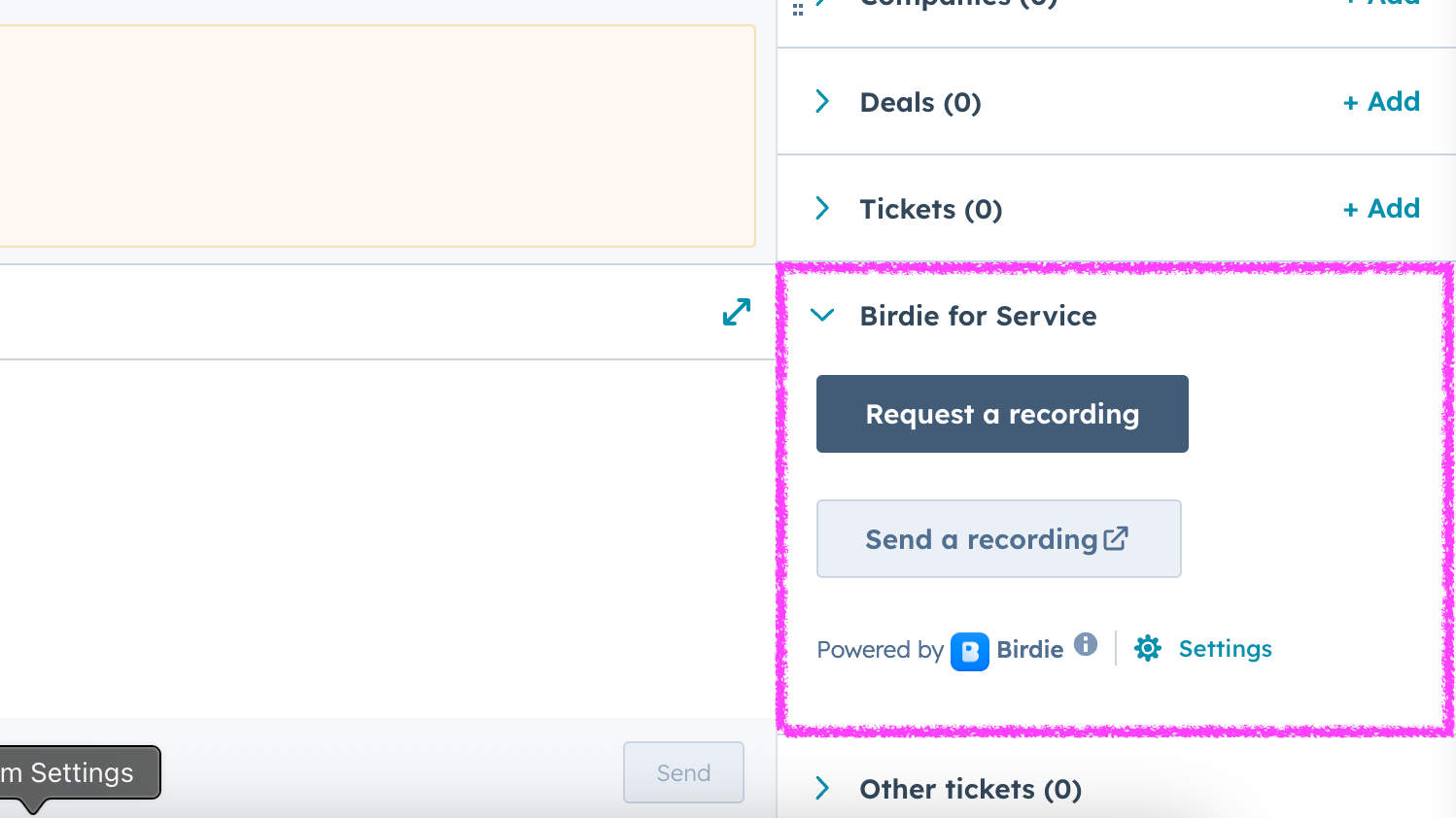
고객에게 화면 녹화 자료를 요청하기
HubSpot 사이드바를 통해 고객에게 화면 녹화를 요청하기
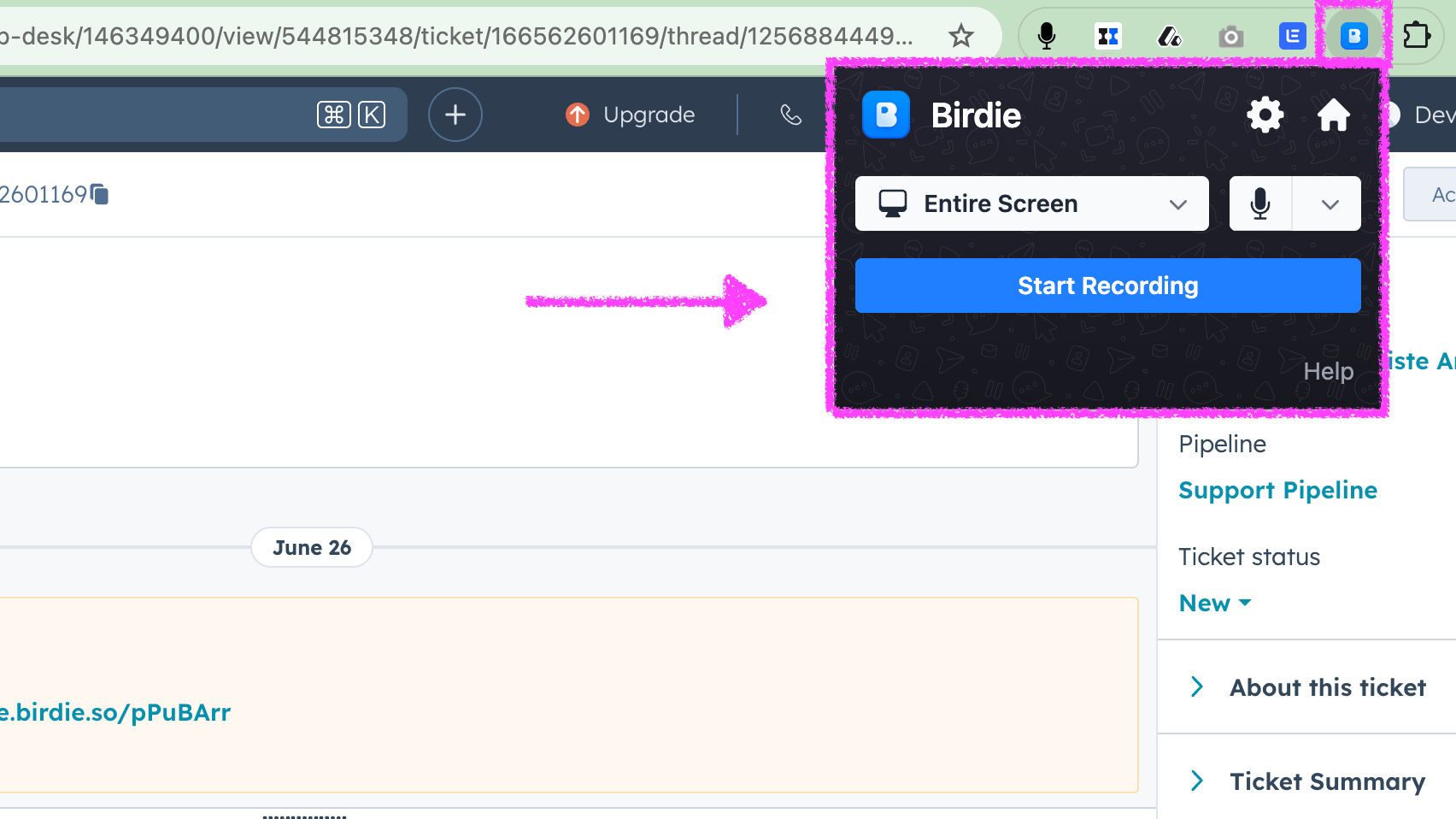
화면 녹화하기
Birdie 확장 프로그램을 사용하여 화면을 녹화하세요. 명확한 동영상 안내를 통해 고객을 도와주세요. 또는 화면을 녹화하여 개발자에게 필요한 모든 정보(로그, 재현 단계 등)를 한 번의 클릭으로 캡처하세요.
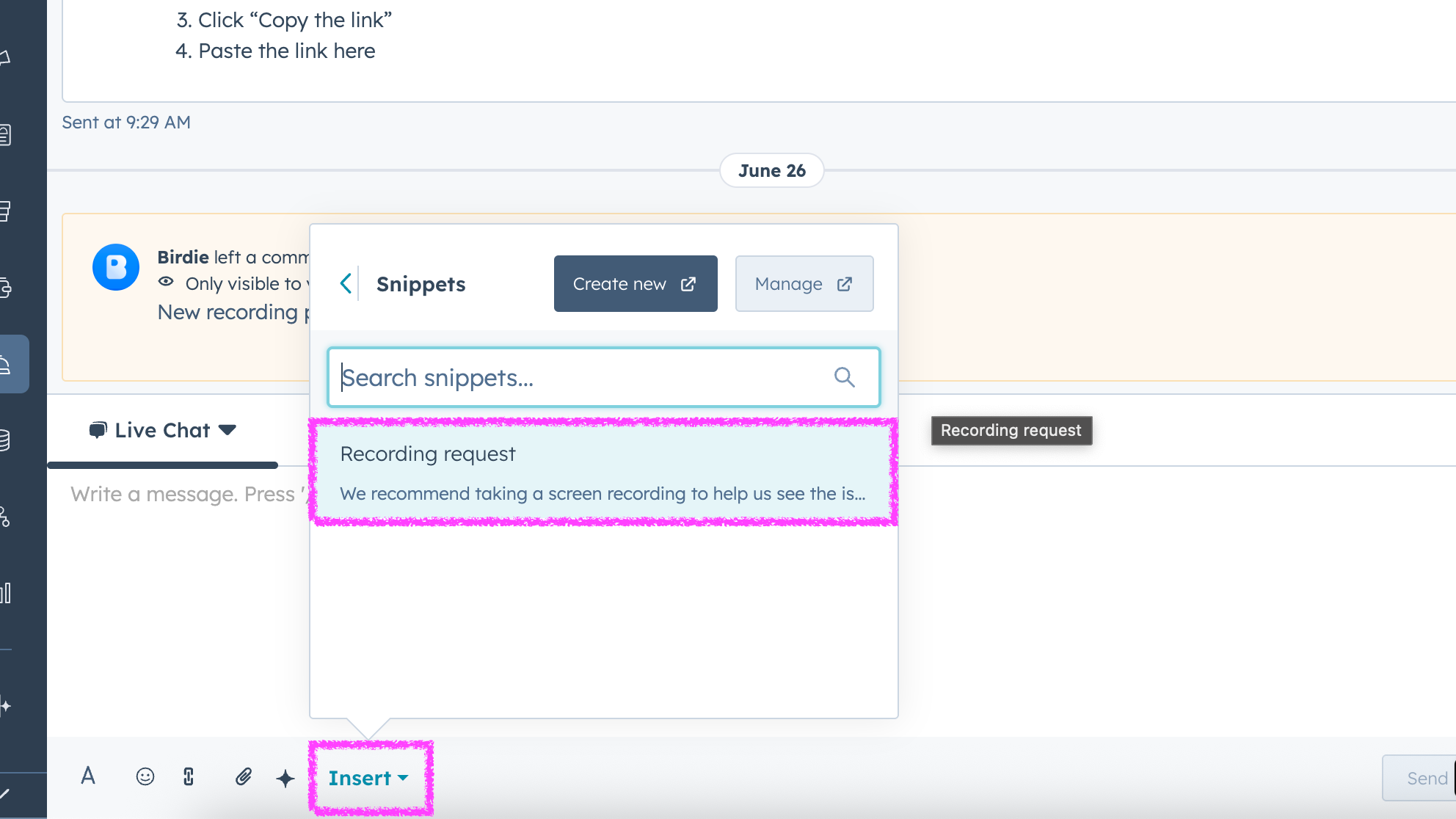
HubSpot 스니펫에 Birdie를 추가하세요
Birdie를 사용하면 Snippets 기능을 통해 HubSpot에서 고객에게 화면 녹화 파일을 요청하는 과정을 간편하게 처리할 수 있습니다.
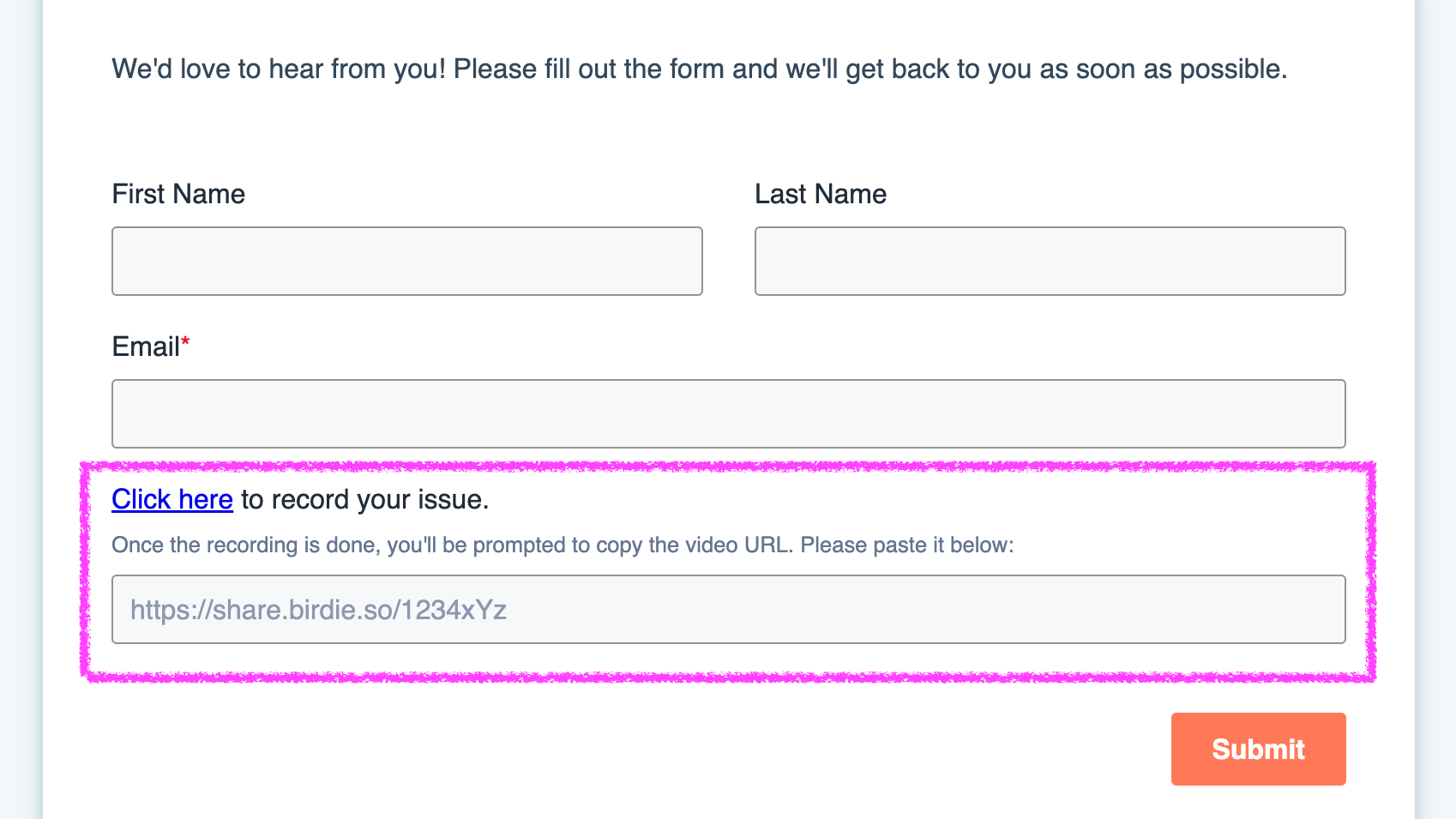
HubSpot 티켓 양식에 Birdie를 추가하세요
고객이 화면 녹화 파일을 첨부하여 문의 티켓을 제출할 수 있도록 하려면, HubSpot 양식에 Birdie를 추가해야 합니다.
앱 기능
공유 데이터
 user | ||
contact | ||
ticket_id | ||
Video | ||
Video |
리뷰
- 2025년 9월 16일
지원팀의 효율성과 버그 해결을 위한 획기적인 변화
Birdie는 지원 운영의 필수적인 부분이 되었습니다. 가장 인상적이었던 점은 팀의 시간을 잡아먹던 긴 진단 통화를 해결해 준다는 점입니다. Birdie는 지원 워크플로우를 간소화하겠다는 약속을 지킵니다. 시간 절약, 팀과 고객 모두의 손쉬운 채택, 견고한 통합 기능의 결합으로 프로세스에 단계를 하나 더 추가하는 것이 아니라 실제로 업무 방식을 개선하는 도구가 되었습니다.
효과가 있는 이유: 진단 시간이 크게 단축됩니다: 콘솔 로그와 세션 기록은 문제를 신속하게 파악하는 데 필요한 모든 정보를 제공합니다. 더 이상 "어떻게 재현하는지 보여줄 수 있나요?"라는 질문을 하지 않아도 됩니다: 지원팀은 바로 생산성을 발휘할 수 있었으며 학습 곡선은 거의 존재하지 않았고 고객은 실제로 이를 사용했습니다: 예상치 못했지만 큰 성과가 있었습니다. 고객들이 별도의 안내 없이도 Birdie를 적극적으로 사용하여 문제를 보고하기 시작했습니다. 원활한 HubSpot 통합: 기존 업무 방식을 방해하지 않고 기존 워크플로에 자연스럽게 통합 뛰어난 지원: Maxime은 우리와 긴밀히 협력하여 HubSpot 통합을 미세 조정하고 모든 것이 우리의 특정 프로세스에 맞게 조정되도록 했습니다. 신속하고 철저합니다.
일상적인 운영에 영향을 미친 사례는 아직 없습니다.
Vigil, B.
가격 책정
무료
€0
Birdie는 평생 무료 요금제는 물론 유료 요금제도 제공합니다.
무료
€0
Birdie는 평생 무료 요금제는 물론 유료 요금제도 제공합니다.
* 여기에 표시된 가격은 표시 목적으로만 사용됩니다. 모든 가격에는 세금, 인센티브, 할인 또는 기타 가격 변수가 포함되어 있지 않습니다. 가장 최신의 정확한 가격 정보를 알고 싶다면 파트너에게 연락해야 합니다. HubSpot은 파트너가 제공하는 이 가격 정보에 대해 어떠한 책임도 지지 않습니다. 마지막 가격 업데이트 날짜: 2026.08.18.